
3D modeling is the process of creating the shape and geometry of a digital object in three-dimensional space. A 3D model can represent almost anything: a character, creature, vehicle, prop, building, product, or entire environment.
But in professional production, making an object look right is only half the job. The geometry also has to work for what comes next. A model built for animation may need to deform cleanly. A game asset may need to perform efficiently in real time. A visual-effects asset may need enough detail and control to hold up in a close shot.
That distinction is important because a model can look convincing in a still image and still be poorly built for production.
This guide explains how 3D models are constructed, what meshes and topology actually are, how modelers move from rough shapes to finished assets, and what beginners should learn first.
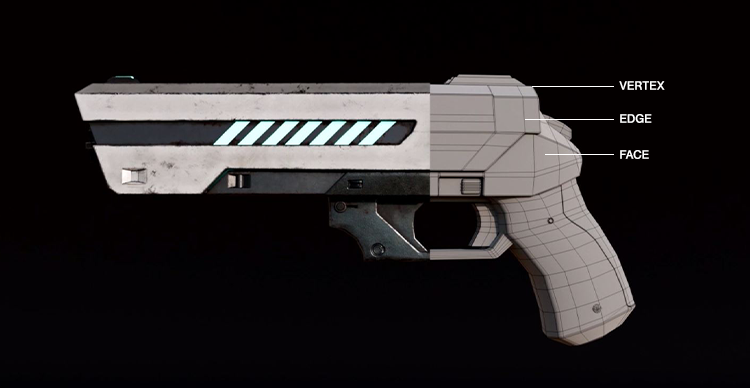 From basic shapes to finished asset: Follow the 3D modeling process as a detailed firearm takes shape, from early blockout through refined geometry.
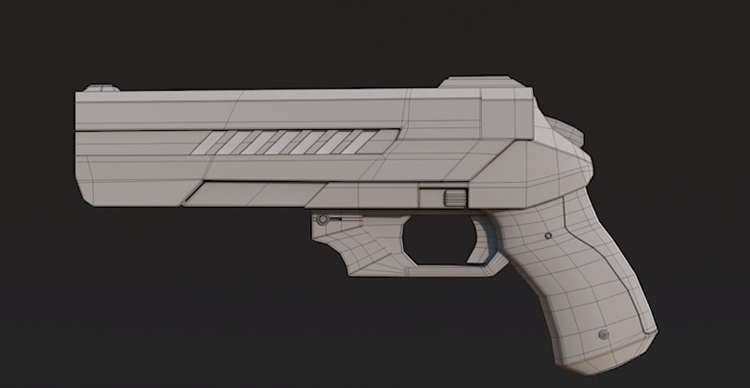 From basic shapes to finished asset: Follow the 3D modeling process as a detailed firearm takes shape, from early blockout through refined geometry.
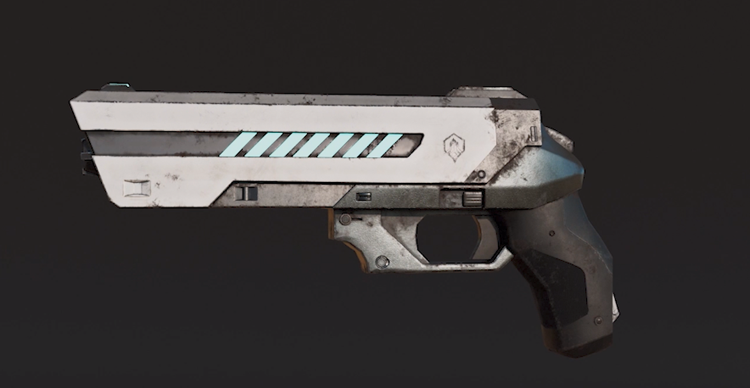 From basic shapes to finished asset: Follow the 3D modeling process as a detailed firearm takes shape, from early blockout through refined geometry.
What is 3D Modeling?
3D modeling is the process of constructing the form and geometry of an object inside a three-dimensional digital environment.
Unlike a flat image, a 3D model has spatial dimensions and can be viewed from different angles. The model itself contains geometry that defines the object's shape. Materials, textures, lighting, animation, and rendering may be added later, but those are separate parts of a broader 3D production pipeline.
That means a 3D model is not the same thing as a finished 3D image.
A rendered image shows what a scene looks like after factors such as lighting, materials, cameras, and rendering have been applied. Modeling is concerned primarily with the underlying object: its form, proportions, surfaces, and geometry.
In practical terms, a modeler might build the shape of a creature's head, a futuristic vehicle, a game environment, a piece of furniture, or a digital double of a real-world object.
The exact way that geometry should be built depends on what the model needs to do afterward. That production requirement is what separates simply creating a recognizable object from creating an asset that can move reliably through a professional pipeline.
Shape → Mesh → Topology → Detail → Use
A useful way to think about 3D modeling is:
Shape → Mesh → Topology → Detail → Use
Shape is the overall form. Does the object have the right silhouette, scale, and proportions?
Mesh is the geometric surface used to represent that form.
Topology describes how the geometry in that mesh is organized.
Detail adds increasingly smaller forms and surface information once the major structure works.
Use asks whether the resulting model actually meets the requirements of its intended job.
That last step is easy to overlook. A model intended only for a still visualization does not necessarily have the same technical requirements as a character that must bend at the shoulders, a game prop that must render efficiently in real time, or a creature that will appear close to camera in a visual-effects shot.
So 3D modeling is not just about producing more detail. It is about building the right geometry for the right purpose.
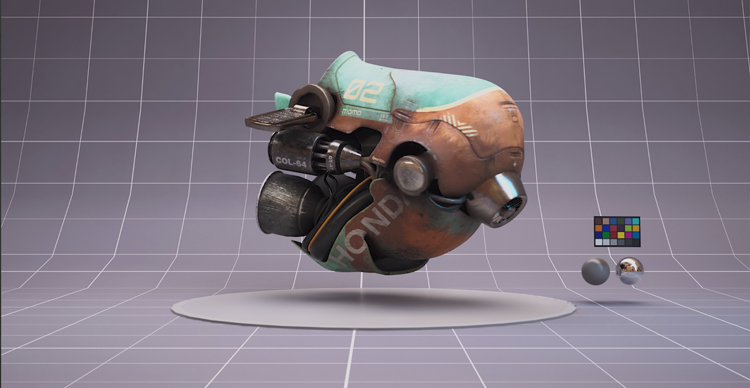 From blockout to final model: See how a 3D spacecraft develops from simple forms into a detailed, production-ready asset.
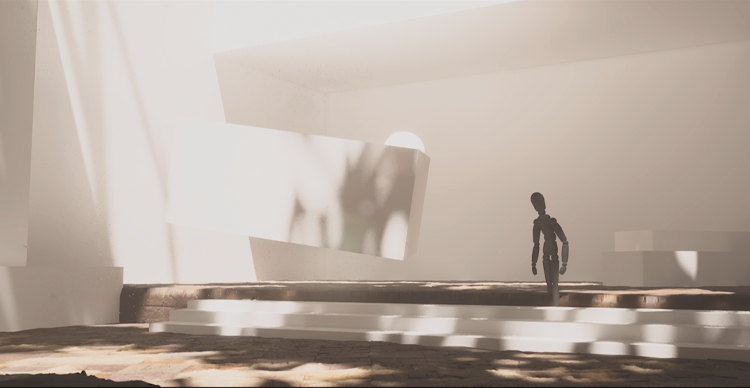 From blockout to final model: See how a 3D spacecraft develops from simple forms into a detailed, production-ready asset.
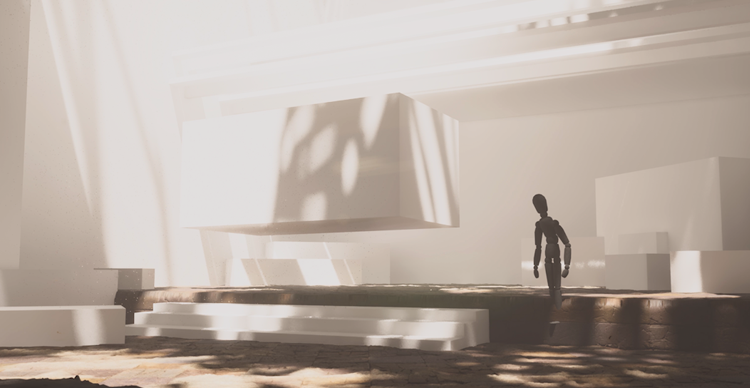 From blockout to final model: See how a 3D spacecraft develops from simple forms into a detailed, production-ready asset.
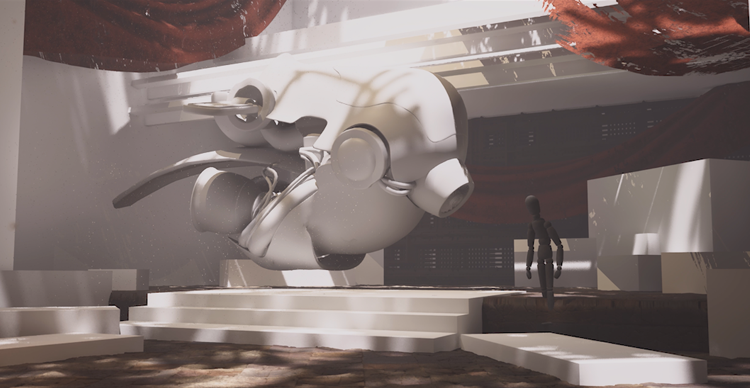 From blockout to final model: See how a 3D spacecraft develops from simple forms into a detailed, production-ready asset.
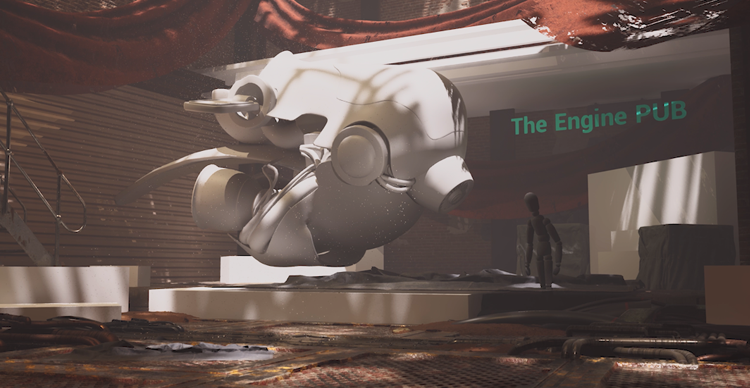 From blockout to final model: See how a 3D spacecraft develops from simple forms into a detailed, production-ready asset.
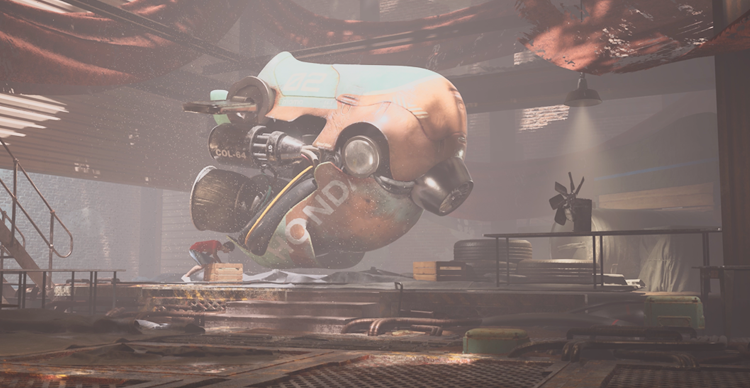 From blockout to final model: See how a 3D spacecraft develops from simple forms into a detailed, production-ready asset.
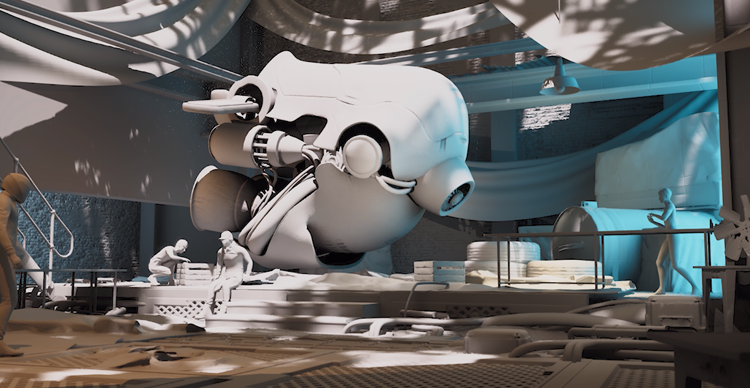 From blockout to final model: See how a 3D spacecraft develops from simple forms into a detailed, production-ready asset.
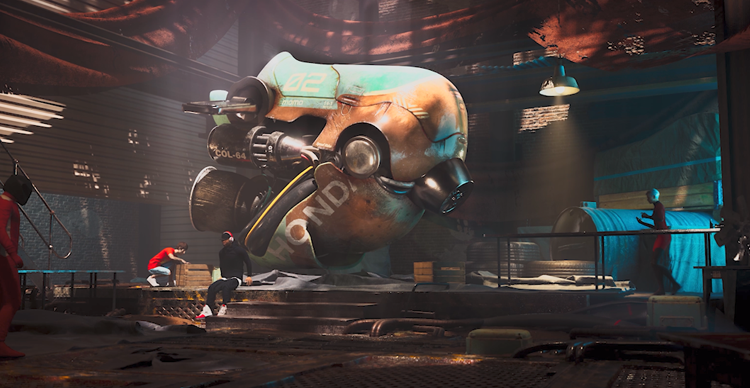 From blockout to final model: See how a 3D spacecraft develops from simple forms into a detailed, production-ready asset.
What is a 3D Model Made Of?
Most polygon-based 3D models are built from three basic components: vertices, edges, and faces. Blender's documentation describes these as the basic elements from which meshes are constructed.
Vertices, Edges, and Faces
A vertex is a point in 3D space.
An edge connects two vertices.
A face creates a surface between connected edges and vertices.
Put enough connected faces together and you get a mesh.
Imagine building a simple cube. Its corners are vertices. The straight lines between those corners are edges. The flat surfaces between the edges are faces. Blender's standard cube, for example, contains eight vertices, twelve edges, and six faces.
More complicated models use the same underlying idea, just at a much larger scale.
A creature's face may contain thousands or millions of points and polygons, but the basic building blocks remain the same.
What is a Mesh?
A mesh is the connected geometric structure that forms the visible surface of a 3D object.
The mesh determines the object's shape, but how that mesh is arranged can matter just as much as how much geometry it contains.
Two models may look nearly identical from one angle while having completely different internal organization. One may be easy to edit and animate. The other may become difficult to deform, optimize, or pass to another artist.
That is where topology becomes important.
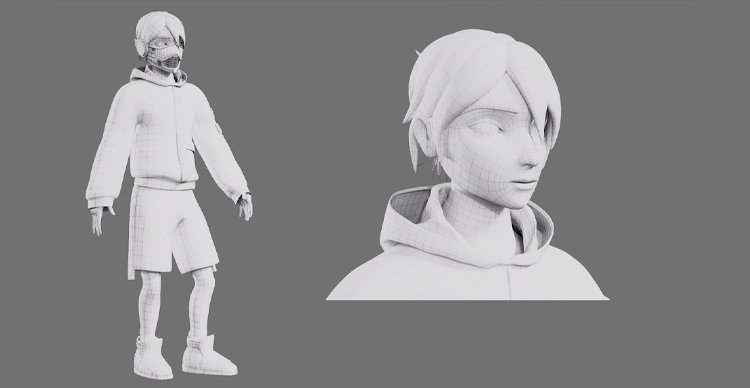 Building a 3D character from the ground up: Follow the modeling process from an initial blockout to a fully developed character with refined forms and details.
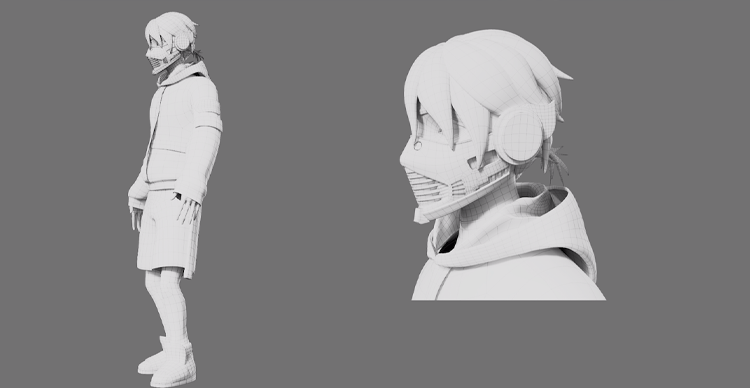 Building a 3D character from the ground up: Follow the modeling process from an initial blockout to a fully developed character with refined forms and details.
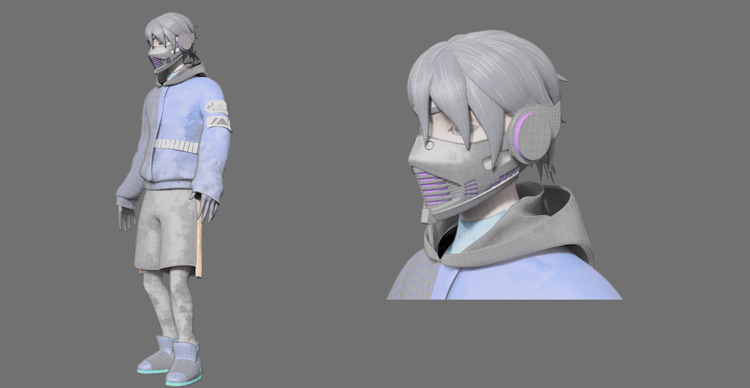 Building a 3D character from the ground up: Follow the modeling process from an initial blockout to a fully developed character with refined forms and details.
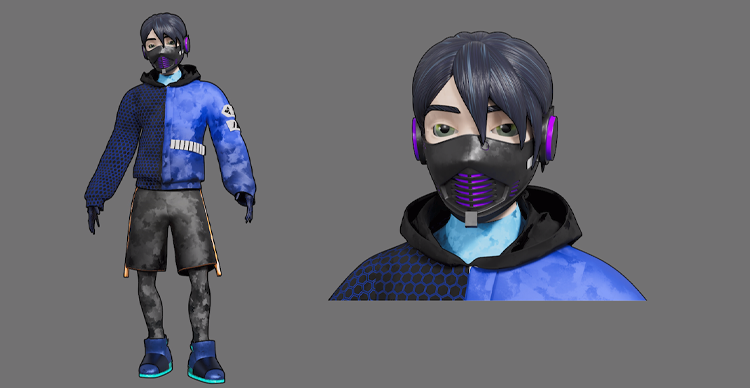 Building a 3D character from the ground up: Follow the modeling process from an initial blockout to a fully developed character with refined forms and details.
Follow One 3D Model From Reference to Finished Geometry
The easiest way to understand 3D modeling is to follow one object through the process. Imagine that a modeler has been asked to create a science-fiction helmet for a character.
The final helmet may eventually contain complex panels, vents, seams, bolts, surface wear, and material detail. But starting with those details would usually be a mistake. The first job is to establish the larger form.
Start With Reference
Before building geometry, the modeler needs to understand what they are making. Reference might include:
- Concept art
- Photographs
- Orthographic drawings
- Measurements
- Existing designs
- Visual references for materials or construction
Reference helps answer basic questions before modeling begins. How wide is the helmet compared with the head? How far does the visor project? Which parts are symmetrical? Which shapes define the design even when seen from a distance?
The intended use also matters from the beginning. A helmet designed for a close-up cinematic character may have different requirements from one intended for a mobile game.
Block Out the Main Shape
The first geometry is often deliberately simple. A modeler might begin with a sphere, cube, cylinder, or combination of primitive shapes and push them into the rough proportions of the helmet.
At this stage, the goal is not tiny seams or mechanical details. The goal is to answer:
- Is the overall size right?
- Does the silhouette work?
- Are the main masses in the right place?
- Does it feel like the intended design from multiple angles?
This is the blockout. A successful blockout can look crude and still be extremely useful. It solves structural problems before the model becomes expensive to change.
Refine the Primary Forms
Once the broad silhouette works, the modeler begins defining the larger shapes more accurately. The visor becomes more precise. The shell gets its intended curvature. Major panels are established. Openings and large transitions between forms are refined.
This stage is still mostly about form rather than decoration. A common beginner mistake is to judge progress by how many details have been added. Professional modeling is often the opposite: the most important decisions are made while the model still looks relatively simple.
Add Secondary Forms
Smaller forms can now be introduced. These might include:
- Panel breaks
- Recessed areas
- Vents
- Structural supports
- Secondary layers
- Folds or anatomy on an organic model
Only after those forms work does it make sense to move toward very small details. The principle is simple: If the silhouette is wrong, adding more polygons only produces a more detailed version of the wrong shape.
Check the Model Before Adding More Detail
Before continuing, the modeler should evaluate whether the asset is structurally working. Questions might include:
- Does the silhouette read correctly?
- Are the proportions convincing?
- Are the major forms clearly separated?
- Is the mesh suitable for the intended production use?
- Will parts of the model need to deform?
- Will the asset need optimization?
- Is the current geometry easy to continue editing?
A strong workflow repeatedly checks the model rather than waiting until the end to discover structural problems. Highest-priority VFS evidence opportunity: replace the hypothetical helmet with a real VFS student or instructor asset and show:
Reference → Blockout → Primary Forms → Refined Geometry → Wireframe → Final Model
This would add something a generic AI summary or competing article cannot easily reproduce.
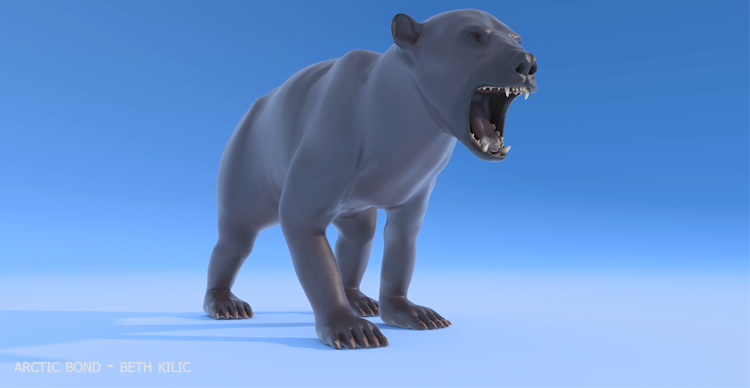 From simple forms to a finished creature: See how a 3D bear model evolves through the stages of modeling, with increasingly refined shapes and details.
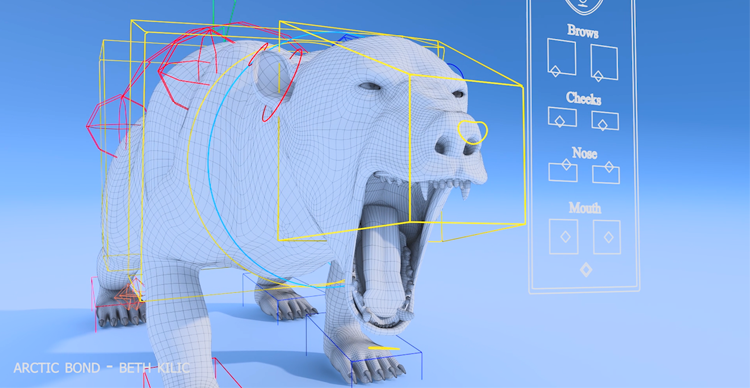 From simple forms to a finished creature: See how a 3D bear model evolves through the stages of modeling, with increasingly refined shapes and details.
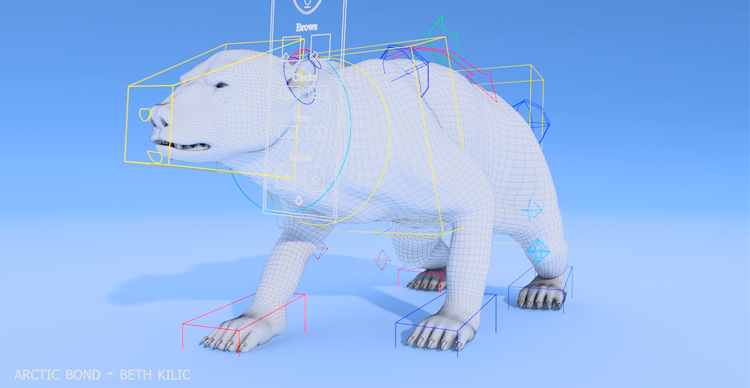 From simple forms to a finished creature: See how a 3D bear model evolves through the stages of modeling, with increasingly refined shapes and details.
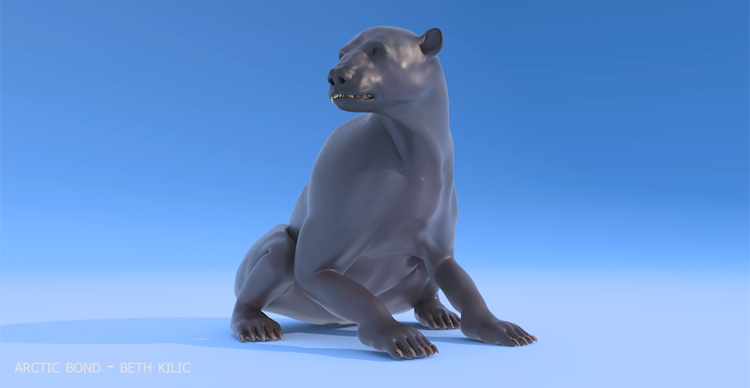 From simple forms to a finished creature: See how a 3D bear model evolves through the stages of modeling, with increasingly refined shapes and details.
 From simple forms to a finished creature: See how a 3D bear model evolves through the stages of modeling, with increasingly refined shapes and details.
What is Topology—and Why Does It Matter?
Topology describes how the vertices, edges, and faces of a mesh are organized. That organization matters because geometry is not used only to describe an object's visible surface. It may also need to deform, subdivide, be optimized, receive additional detail, or move through other stages of production.
Autodesk's retopology tools, for example, are designed to create new, cleaner topology while preserving the surface characteristics of an existing mesh.
Polygon Count vs Topology
These two concepts are related, but they are not the same. Polygon count tells you how much geometry exists. Topology tells you how that geometry is organized.
A model with more polygons is not automatically better. Adding geometry may allow a model to represent more complex shapes, but the arrangement of that geometry still determines how easily the asset can be controlled.
Imagine two character faces with roughly similar polygon counts. One has edge loops organized around the eyes and mouth in ways that support facial movement.
The other distributes polygons with little consideration for deformation. Both may look acceptable while static. Once animated, their behavior can be very different.
Edge Flow and Deformation
Edge flow describes how edges travel across the surface of a model. For objects that need to bend or deform, edge placement can influence how predictable that deformation is.
This is especially relevant around areas such as:
- Shoulders
- Elbows
- Knees
- Mouths
- Eyelids
- Other joints or flexible surfaces
Modelers do not need to turn every mesh into a perfectly uniform grid. Instead, topology should support the actual requirements of the asset. A static architectural prop and an expressive animated character do not have identical needs.
When is Retopology Needed?
Some workflows create extremely dense or irregular geometry first and then construct a cleaner mesh over that surface. This process is called retopology.
A common example is a detailed digital sculpt. The sculpt may contain enough geometry to represent tiny surface forms but may not be organized in the most useful way for animation or real-time production.
The workflow can then become: High-resolution sculpt → retopology → controlled production mesh
Autodesk describes retopology as generating new topology based on a reference surface, while its current Maya tools also let users target face counts and adjust topology regularity and face uniformity.
Retopology is not required in exactly the same way for every asset or pipeline. The important question is whether the existing geometry is suitable for what needs to happen next.
How Do Modelers Build 3D Geometry?
There is no single universal method for constructing every 3D model. Different techniques are useful for different shapes, industries, and production requirements.
That is why statements such as “there are exactly three types of 3D modeling” can be misleading. Modeling can be classified in several different ways depending on the workflow being discussed.
Polygon Modeling
Polygon modeling works directly with the vertices, edges, and faces of a mesh. A modeler can extrude surfaces, insert edge loops, move components, combine forms, and gradually build increasingly complex geometry.
It is widely useful because it offers direct control over the structure of the mesh. Polygon modeling can be used for:
- Characters
- Environments
- Props
- Vehicles
- Hard-surface objects
- Stylized models
- Many other assets
Digital Sculpting
Digital sculpting approaches modeling more like working with clay. Instead of thinking about every polygon from the start, the artist can focus heavily on surface form, anatomy, shape, and detail.
Sculpting is especially useful for complex organic subjects such as characters and creatures, although it can be used in many other ways. A sculpt may later be retopologized if a cleaner or more controlled mesh is required.
Procedural and Other Modeling Methods
Procedural modeling creates or modifies geometry using systems, rules, parameters, or node-based processes rather than building every detail manually.
This can be particularly powerful when a model or environment needs:
- Repeatable variation
- Scalable complexity
- Controlled procedural changes;
- Large numbers of related forms.
Houdini is widely associated with procedural geometry workflows, while other tools support procedural approaches in different ways.
There are also NURBS, CAD-oriented, parametric, scan-based, and other forms of 3D construction. The important beginner takeaway is not to memorize every category. It is to understand that different methods solve different modeling problems.
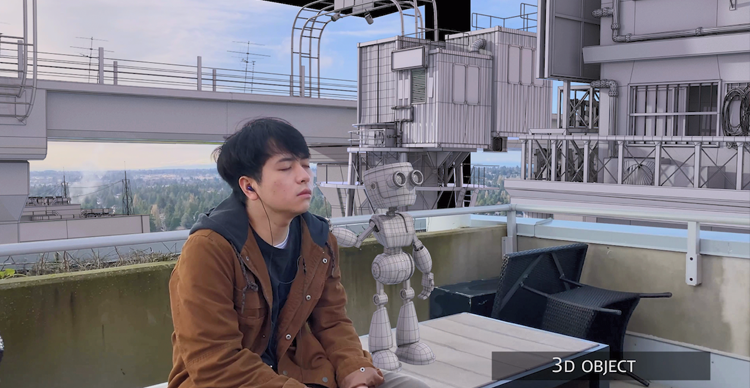 Different designs, different modeling challenges: Explore two 3D character models, from a detailed robot to Hornet from Hollow Knight: Silksong, and see how their forms develop through the modeling process.
 Different designs, different modeling challenges: Explore two 3D character models, from a detailed robot to Hornet from Hollow Knight: Silksong, and see how their forms develop through the modeling process.
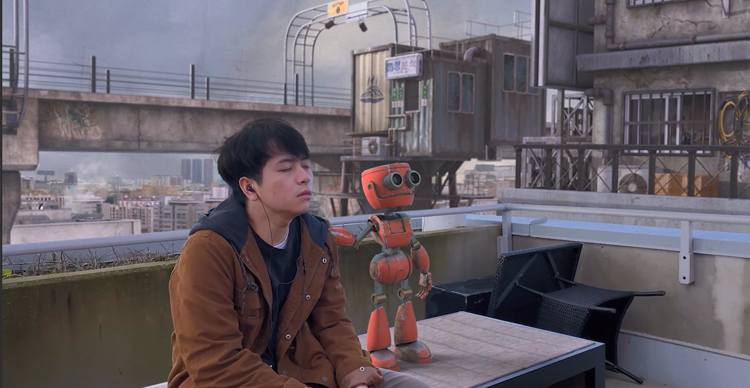 Different designs, different modeling challenges: Explore two 3D character models, from a detailed robot to Hornet from Hollow Knight: Silksong, and see how their forms develop through the modeling process.
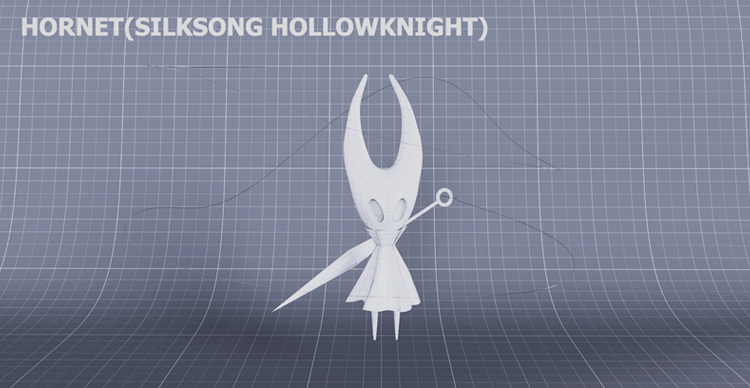 Different designs, different modeling challenges: Explore two 3D character models, from a detailed robot to Hornet from Hollow Knight: Silksong, and see how their forms develop through the modeling process.
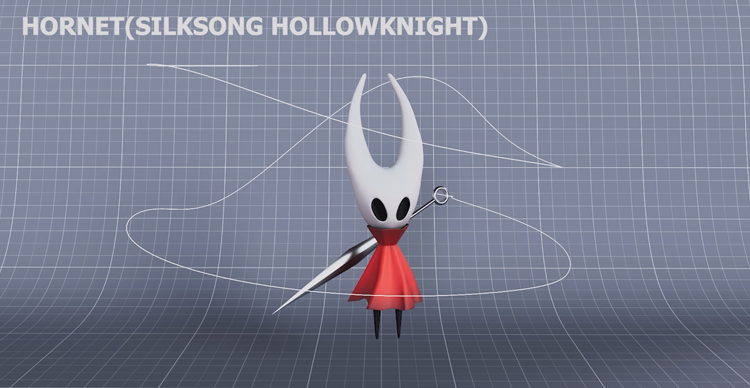 Different designs, different modeling challenges: Explore two 3D character models, from a detailed robot to Hornet from Hollow Knight: Silksong, and see how their forms develop through the modeling process.
Modeling vs Texturing vs Rigging vs Animation vs Rendering
3D modeling is one part of a broader production process.
| Stage | Main question |
|---|---|
| Modeling | What is the object's shape and geometry? |
| Texturing / Surfacing | What does the surface look like? |
| Rigging | How can the object or character be controlled and deformed? |
| Animation | How does it move or change over time? |
| Rendering | How is the final image generated? |
A modeler might create the geometry of a creature, but another artist may define the color and texture of its skin. A rigger may build the controls that allow the creature to move. An animator may then create its performance.
These stages often influence one another, and real pipelines are not always perfectly linear. A rigging problem may send a model back for topology changes. A lighting test may reveal a surface problem. A game-performance test may require asset optimization.
That is why production awareness is useful even for a modeler who specializes primarily in geometry.
Why Film and Game Models May Need Different Geometry
There is no single ideal mesh for every production context. A model designed for an offline-rendered film shot and one designed for a real-time interactive environment can face different technical constraints.
Film and VFX
Depending on the production, film and VFX assets may need:
- Detailed surfaces
- Close-up fidelity
- Predictable deformation
- Integration with other visual-effects processes
- Geometry that supports high-quality offline rendering
That does not mean film assets should simply contain as many polygons as possible. Geometry still needs to be manageable and appropriate to the task.
Games and Real-Time Work
Real-time environments must continuously render frames while also handling animation, simulation, interaction, game logic, and other processes. As a result, the target platform and performance budget matter.
Epic's Unreal Engine documentation emphasizes that real-time projects operate within finite CPU, GPU, memory, and rendering budgets, and provides dedicated asset-optimization workflows for that reason.
The exact optimization strategy depends on the engine, platform, asset, and current rendering technology. Modern systems such as Unreal Engine's Nanite can also change how teams approach very dense geometry, so simple rules like “games always use low-poly models” are increasingly inaccurate.
High-Poly, Low-Poly, and Baking
A common real-time asset workflow begins with a highly detailed version of a model. A second, more efficient mesh can then be created for real-time use.
Surface details from the high-resolution version can be transferred into textures such as normal maps and applied to the optimized model. This allows a lower-complexity asset to preserve much of the visual impression of the detailed source.
This is often described as: hHigh-poly → low-poly → baking
It is a useful production concept, but not a universal requirement for every modern asset. The larger principle is more durable: The geometry should be appropriate for the environment in which the asset will actually be used.
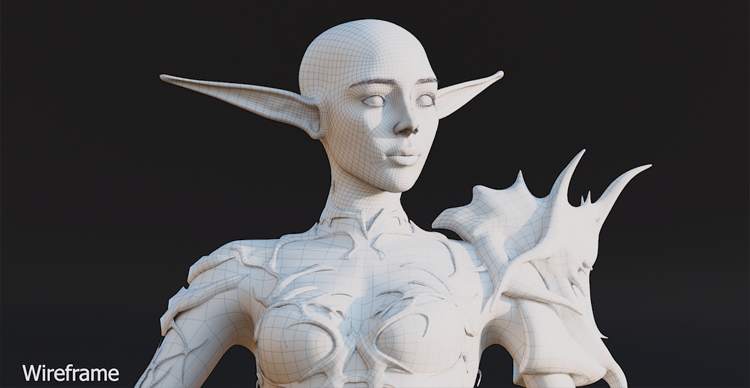 Bringing a mythical character to life in 3D: Follow the transformation from an initial model to a fully developed character with refined anatomy, clothing, and details.
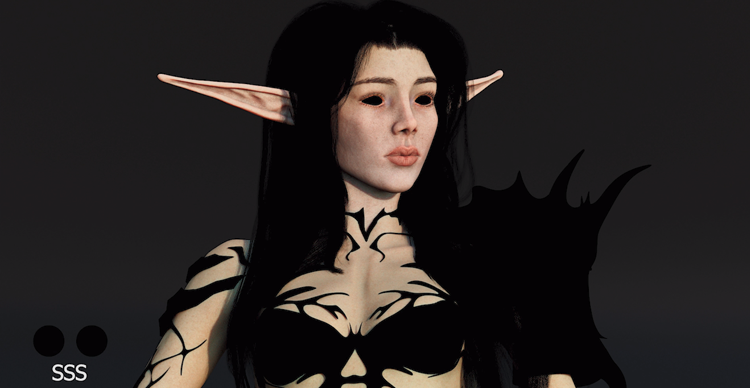 Bringing a mythical character to life in 3D: Follow the transformation from an initial model to a fully developed character with refined anatomy, clothing, and details.
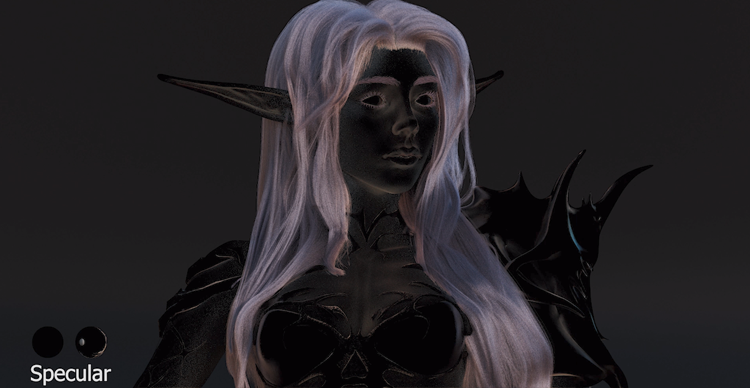 Bringing a mythical character to life in 3D: Follow the transformation from an initial model to a fully developed character with refined anatomy, clothing, and details.
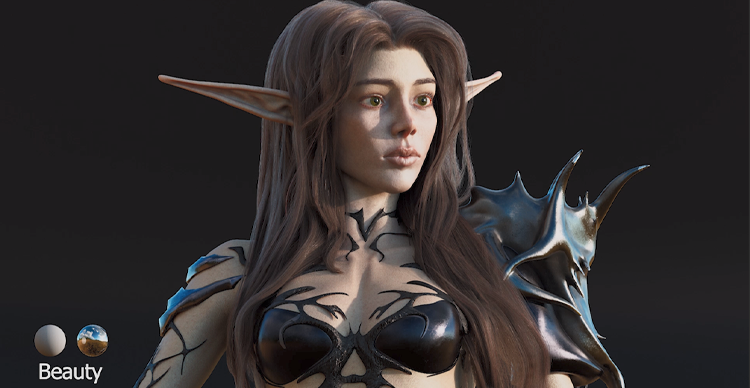 Bringing a mythical character to life in 3D: Follow the transformation from an initial model to a fully developed character with refined anatomy, clothing, and details.
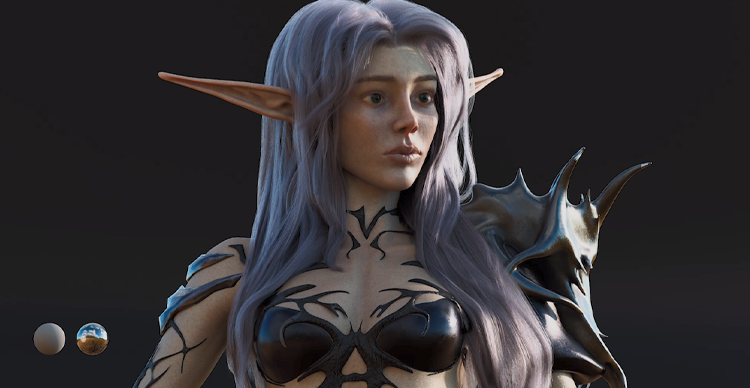 Bringing a mythical character to life in 3D: Follow the transformation from an initial model to a fully developed character with refined anatomy, clothing, and details.
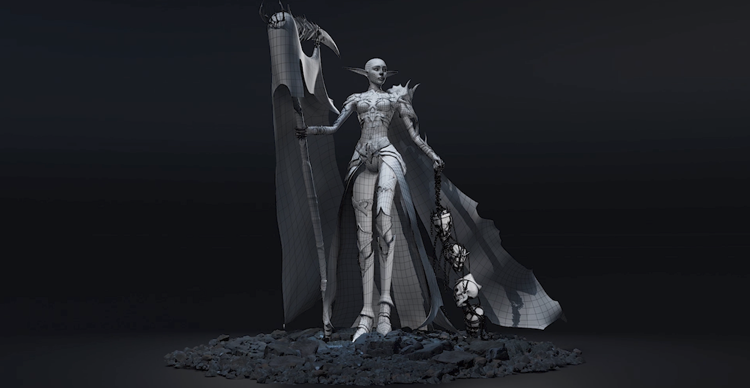 Bringing a mythical character to life in 3D: Follow the transformation from an initial model to a fully developed character with refined anatomy, clothing, and details.
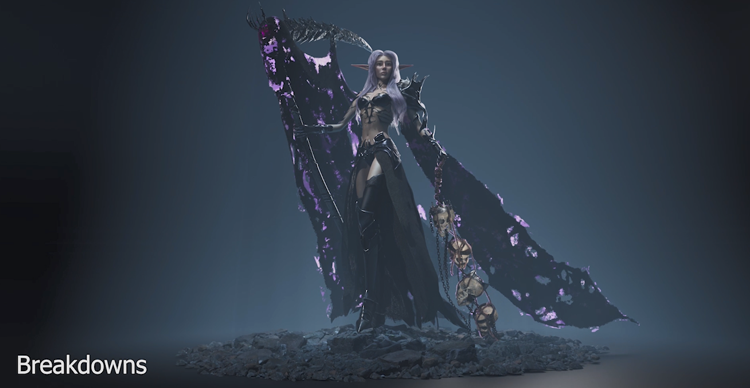 Bringing a mythical character to life in 3D: Follow the transformation from an initial model to a fully developed character with refined anatomy, clothing, and details.
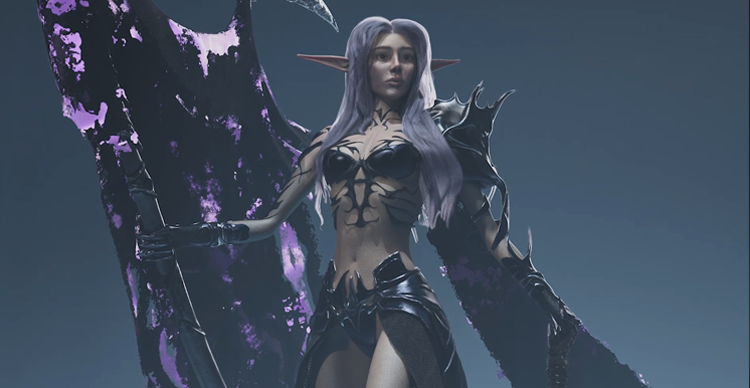 Bringing a mythical character to life in 3D: Follow the transformation from an initial model to a fully developed character with refined anatomy, clothing, and details.
When is a 3D Model Actually Finished?
A model is not necessarily finished when it looks detailed. A more useful production test is whether it satisfies the requirements of its intended next stage.
For one asset, that next stage might be rigging. For another, it could be surfacing, rendering, compositing, game-engine integration, or 3D printing. This is why “finished” is partly contextual.
Production-Ready Model Checklist
A practical production-readiness review might ask:
Shape
- Does the silhouette work?
- Are the proportions correct for the design?
Geometry
- Is the topology appropriate to the intended use?
- Is the amount and distribution of geometry reasonable for the target?
Movement
- If the asset must animate, can important areas deform appropriately?
Technical preparation
- Is the model organized clearly?
- Is its scale appropriate?
- Are naming and handoff requirements satisfied where relevant?
Pipeline
- Can the next artist, tool, or production stage actually use the asset?
A beautiful still render can hide many of these problems. A production-ready model has to survive beyond the still image.
What Should a Beginner Learn First?
3D modeling can feel difficult at first because a beginner is learning two things at once:
- How to operate unfamiliar 3D software
- How to make visual and technical modeling decisions
That is why trying to learn every tool in a large software package can be frustrating. A better approach is to build a sequence of fundamental skills.
A Simple 3D Modeling Learning Progression
1. Learn Navigation and Basic Transforms
Before modeling anything complicated, become comfortable moving through 3D space. Learn to:
- Orbit around an object
- Move the camera
- Select objects
- Move
- Rotate
- Scale
These actions sound basic, but they need to become almost automatic.
2. Build With Simple Primitives
Work with cubes, spheres, cylinders, and planes. Do not rush into an elaborate character. Instead, learn how basic forms can be combined and changed to create more complex objects.
3. Study Silhouette and Proportion
Try to make an object recognizable before adding small details. This teaches you to judge:
- Overall shape
- Relative size
- Negative space
- Proportion
- Visual balance
A simple model with strong proportions is usually more convincing than a highly detailed model with weak structure.
4. Learn Basic Mesh Editing
Now become comfortable manipulating:
- Vertices
- Edges
- Faces
- Edge loops
- Extrusions
- Basic mesh operations
The goal is not to memorize menus. It is to understand how changing geometry changes form.
5. Model From Reference
Tutorial exercises are useful, but eventually you need to interpret reference yourself. Pick a manageable object and work from photos or concept art. This forces you to make decisions rather than simply repeating someone else's clicks.
6. Learn Basic Topology
Once you can build recognizable forms, learn why geometry organization matters. You do not need advanced character topology immediately.
Start by understanding:
- Clean mesh structure
- Edge placement
- Unnecessary geometry
- How topology affects editing and deformation
7. Finish One Small Asset
Finishing is its own skill. Choose something small enough to complete and take it from reference through a final model. A finished chair, helmet, prop, or simple stylized object can teach more about workflow than ten abandoned complex characters.
The broader rule is: Learn modeling fundamentals first. Software mastery becomes much easier when you understand what you are trying to accomplish with the tool.
What Software is Used for 3D Modeling?
There is no single best 3D modeling program for every person and every task. A more useful question is: What kind of modeling do you need to do?
| Modeling task | Common tools |
|---|---|
| General polygon modeling | Maya, Blender |
| Digital sculpting | ZBrush, Blender |
| Procedural modeling | Houdini |
| Real-time asset workflows | Maya or Blender alongside game-engine tools |
Maya provides broad polygon-modeling and retopology tools, including workflows for generating and refining new topology.
Blender provides a broad mesh-modeling toolset built around the same fundamental vertex, edge, and face structure discussed earlier.
ZBrush is heavily associated with digital sculpting and high-resolution form development, while Houdini is widely used for procedural approaches.
The important point for beginners is that fundamental concepts transfer. If you understand silhouette, proportion, mesh structure, topology, and reference, changing software becomes much easier than trying to substitute software knowledge for modeling knowledge.
How Is AI Changing 3D Modeling?
AI can now participate directly in parts of 3D asset creation. For example, Autodesk introduced Wonder 3D in 2026 with text-to-3D and image-to-3D capabilities designed to generate editable 3D characters and objects from prompts or reference images.
That changes the starting point for some workflows. Instead of beginning every object from a primitive or an empty scene, an artist may begin from generated geometry and refine it.
But the useful production question is not only: Can AI generate a 3D object? It is: Is that object ready for the job it needs to perform?
The model may still need to be evaluated for:
- Proportions
- Topology
- Editability
- Deformation
- Optimization
- Consistency with the art direction
- Downstream pipeline requirements
AI-assisted tools are moving quickly, so individual capabilities will continue to change. The underlying production requirement remains more stable: geometry still has to work in the context where it will actually be used.
What Does a 3D Modeler Do?
A 3D modeler's work can vary significantly by industry and specialization. Depending on the project, modelers may create:
- Characters
- Creatures
- Props
- Vehicles
- Buildings
- Environments
- Products
- Production assets for animation, VFX, games, or visualization
Some artists specialize deeply in characters or hard-surface objects. Others work across many kinds of assets. The modeler also rarely works in isolation.
Their geometry may eventually be passed to:
- Texture or surfacing artists
- Riggers
- Animators
- Lighting artists
- VFX artists
- Game-engine teams
That is one reason production awareness matters. The modeler's decisions affect people and processes downstream.
Learn 3D Modeling at VFS
At Vancouver Film School, 3D modeling is taught within our 3D Animation & Visual Effects diploma program.
The program is a 12-month, full-time diploma delivered across six terms, with specializations in 3D Animation, 3D Modeling, and Visual Effects. Maya, Nuke, ZBrush, Houdini, Substance Painter, Marvelous Designer, Unreal Engine 5, Photoshop, and Premiere are among the program's core tools.
Students first develop broader 3D production and pipeline skills before choosing a specialization in the third term. The program is designed around building work that can move through a studio-style production process rather than treating modeling as an isolated software exercise.
That is also why production readiness matters throughout this guide. Learning to build a recognizable object is only the beginning. Professional 3D modeling requires understanding how shape, mesh structure, topology, detail, and intended use work together.
If you’re looking for structured training in those skills, the next step is to explore our 3D Animation & Visual Effects program and the 3D Modeling specialization.
FAQ
Is 3D modeling hard to learn?
The basics are learnable, but 3D modeling combines software skills with visual judgment and technical problem-solving. Beginners usually progress faster when they learn navigation and simple forms first, then move into proportion, mesh editing, reference-based modeling, and basic topology rather than trying to master an entire software package at once.
What are the main types of 3D modeling?
There is no single universal list of exactly three types. Common approaches include polygon modeling, digital sculpting, procedural modeling, NURBS, CAD-oriented modeling, scanning, and other methods. Different classifications are useful in different industries.
What is an example of 3D modeling?
Creating a digital character is one example. A modeler may begin with reference, block out the proportions, refine the character's forms, organize the topology, and prepare the geometry for later stages such as texturing, rigging, and animation.
What is the difference between 3D design and 3D modeling?
The terms can overlap. 3D modeling usually refers specifically to constructing digital three-dimensional geometry. 3D design can be broader and may include modeling as well as planning, visualization, layout, materials, engineering decisions, or other aspects of creating a three-dimensional solution.
Do you need to know how to draw to learn 3D modeling?
Strong drawing skills can help with observation, proportion, anatomy, design, and visual communication, but drawing ability is not a prerequisite for beginning 3D modeling. The importance of drawing varies by specialization.
Is 3D modeling the same as animation?
No. Modeling creates the object's form and geometry. Animation changes an object's pose, position, shape, or other properties over time. A model may later be rigged so that an animator can control it.
Can AI create 3D models?
Yes. Current tools can generate 3D geometry from text or images, and this capability is developing rapidly. Generated geometry still needs to be judged against the requirements of the intended production workflow.
What software do 3D modelers use?
Common tools include Maya, Blender, ZBrush, Houdini, 3ds Max, and specialized applications for particular workflows. The best choice depends on whether you are doing polygon modeling, sculpting, procedural work, real-time production, visualization, or another type of 3D work.